
Application Provisioning
Register a new client application within the rNet ecosystem to generate your secure credentials and define authentication routing.
Provision a New Client
1
Initialize Registration
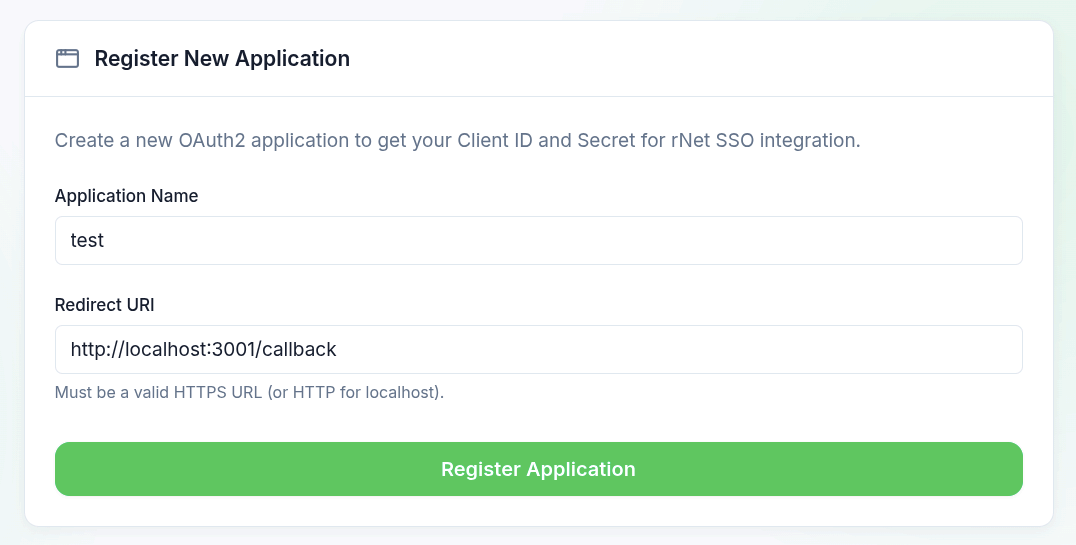
From your Developer Dashboard, initiate the process by clicking the + New button under the Applications panel, or interact with the Register New Application module.
2
Define Application Parameters
Provide the core routing details for your client:
- Application Name: The public-facing identifier displayed to users during the OAuth authorization flow (e.g., "Enterprise AI Copilot").
- Redirect URI: The exact, strictly-matched endpoint where rNet will return the user post-authentication. Refer to Callback Configuration for strict matching rules.
3
Generate Cryptographic Credentials
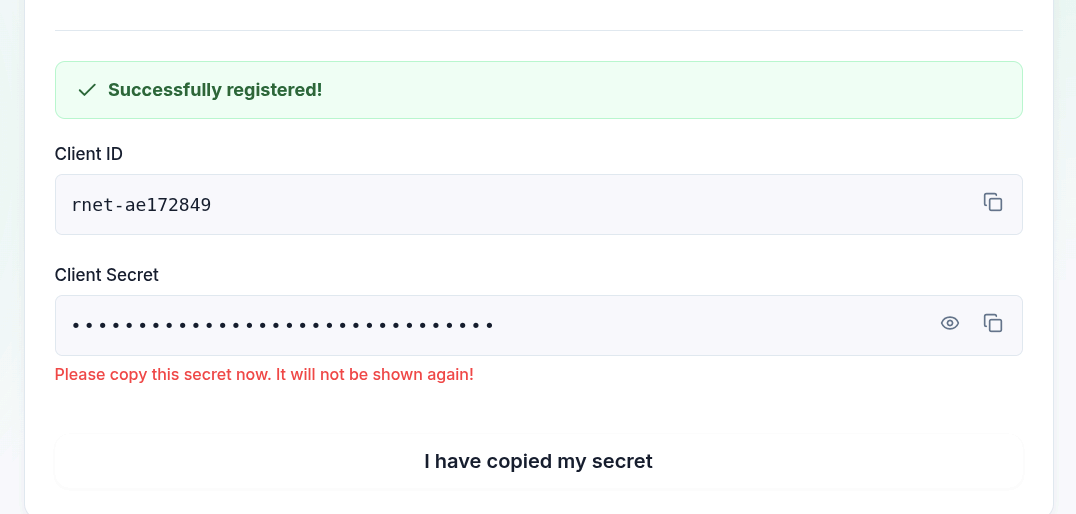
Confirm the registration. The rNet provisioning engine will immediately generate a unique Client ID and a highly secure Client Secret.
Provisioning Interface
4
Secure Your Secret
Upon generation, you will be presented with your credentials. Copy the Client Secret immediately. For security reasons, the raw secret is never stored in plaintext and cannot be retrieved again.
Credential Generation
Irrecoverable Secrets
The Client Secret is an irrecoverable cryptographic key. Store it securely in a centralized secret manager or backend environment variable. Loss of this secret requires a full credential rotation.
5
Inject Credentials into Backend
Inject the generated credentials securely into your backend environment. Under no circumstances should these be exposed to client-side bundles.
bash
RNET_CLIENT_ID=rnet-xxxxxxxx
RNET_CLIENT_SECRET=xxxxxxxx-xxxx-xxxx-xxxx-xxxxxxxxxxxx
Callback Configuration
The Callback URL (Redirect URI) serves as the secure handoff point post-authentication. Upon successful verification, rNet routes the user's browser back to this exact endpoint, appending a short-lived authorization code.
Strict Matching Protocol
For security against redirect attacks, the URI provided during the runtime login request must strictly match the predefined URI in your dashboard. This includes protocol, domain, port, path, and trailing slashes. Any deviation results in an immediate authorization termination.
Routing Examples
Valid Configurations
https://myapp.com/api/auth/callbackhttps://api.myapp.com/v1/oauth/rnethttp://localhost:3000/callback(Dev)http://localhost:3001/auth/rnet(Dev)
Invalid Configurations
http://myapp.com/callback(Requires HTTPS)https://myapp.com(Missing path)192.168.1.5/callback(Raw IP address)https://myapp.com/callback/(Trailing slash)
Next Module
With provisioning complete, integrate the authentication flow by following the User Authentication guide.